Mimecast is a corporate spam filter that sits on top of traditional email spam filters. For example, if you’re emailing enterprises, they will likely have a corporate spam filter protecting their inbound emails.
Other emails of corporate spam filters include: Proofpoint, Barracuda, and various other ones.
When you upload leads on your leads page (or within your campaigns page), we automatically do a reverse lookup to see which of your leads are using Mimecast.
We then add this as a “tag” on the lead level.
Here’s an example from the leads page:
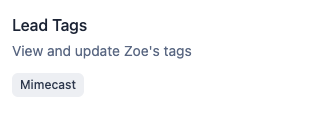
This tag will be visible on every page where you interact with leads (eg leads page, campaign leads page, individual leads page, master inbox, etc.)
As of early March 2026, Mimecast has released a new update that makes it very easy for them to block cold emails. You might see an increase in bounces when sending to leads that are tagged “Mimecast”.
You have a few options, with the easiest one being, filter and remove any lead that is tagged Mimecast (if your total addressable market, or TAM, is large enough).
If you still want to target Mimecast leads, we recommend the following
put Mimecast leads into a separate campaign (you can also add Proofpoint and Barracuda) leads here too
use a different set of domains to sequence these leads (so that if you get bounces, you don’t burn all of your domains)
use domain masking (by emailguard.io) or dedicated landing pages on your secondary domains
use “generic” domains vs secondary domains that are similar to your primary domains
use domains that are older than 45 days
have a lot of copy variances
